
WooCommerce order confirmation
Confirm every order. Live.
Live Order Confirmation lets you accept or reject new WooCommerce orders while the customer is still on the page. Set a ready time, add a comment, and the customer sees your answer right away, and gets it by email.
Works with the block and classic checkout
Made & supported in Sweden
See it in action
The shop and the customer, side by side.
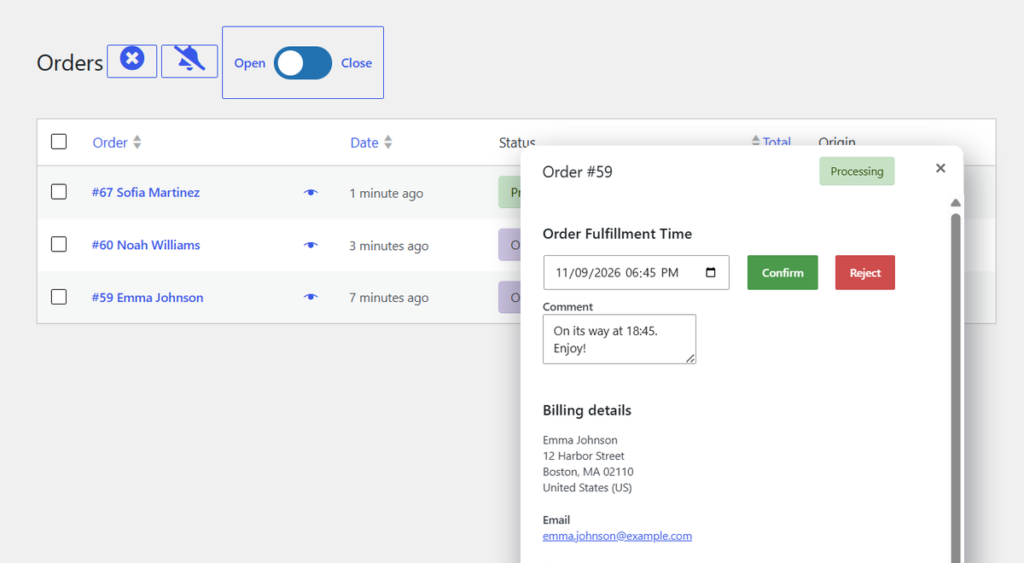
On the left the shop manager’s order view, on the right a customer placing an order. The order pops in, the shop confirms it with a ready time, and the customer’s page updates by itself.
Don’t make customers guess.
Restaurants, bakeries and shops that cook or pack to order can’t always promise the time a checkout shows. With Live Order Confirmation you look at the order first, then tell the customer exactly when it’s ready.
Without confirmation
- Orders you can’t make in time
- Customers who call to ask if you got it
- No way to say no before the food is due
With Live Order Confirmation
- You accept or reject every order
- A ready time the customer can trust
- An answer on screen and by email
How it works
One order, three moments.
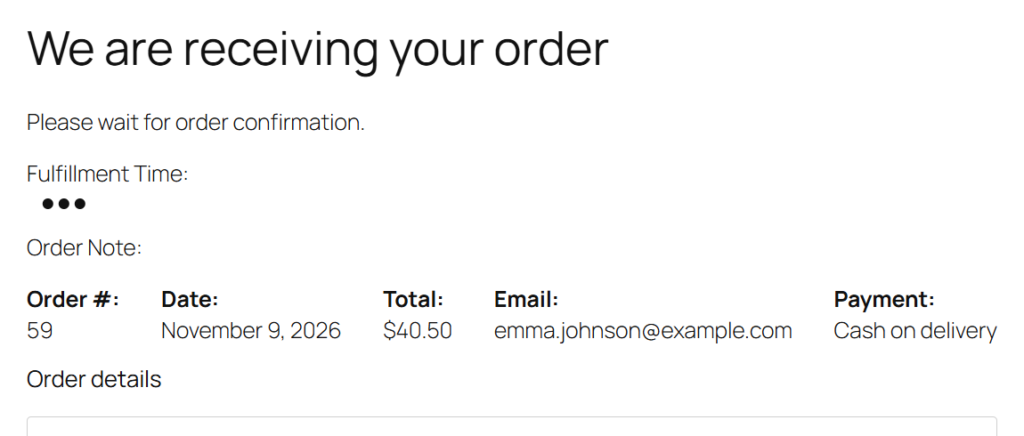
The customer orders and waits
After checkout the order received page asks the customer to wait for your confirmation, with a live status. If you don’t answer within the time you set, it tells them the answer will come by email.
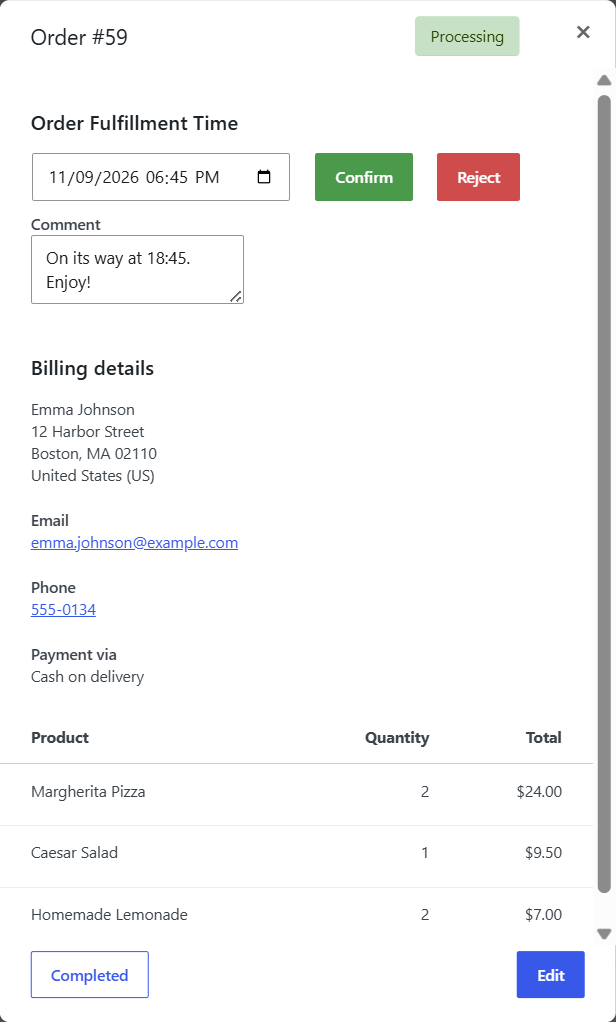
You confirm, with a ready time
The order pops into the Live Order page with a sound and a flash. Open it, pick the fulfillment time, add a comment if you like, and click Confirm, or Reject.
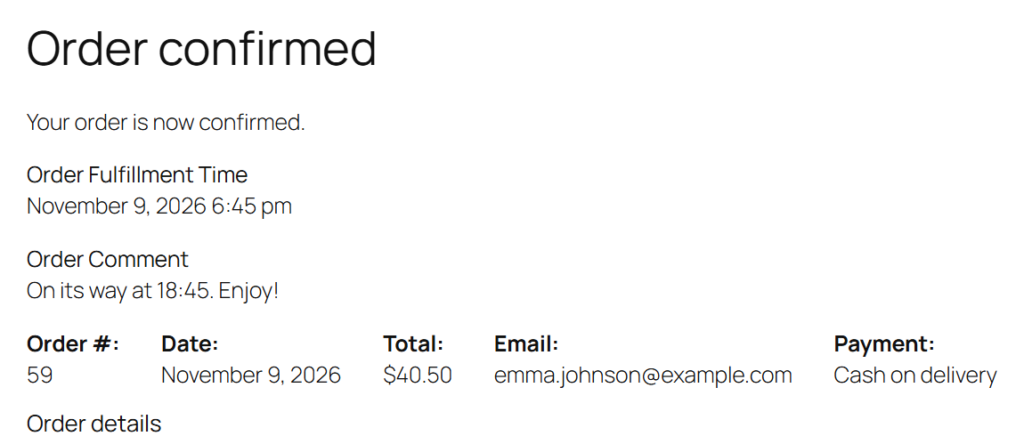
The customer sees it at once
The waiting page turns into “Order confirmed” with your time and comment, without a reload. The “Confirmed Order to Customer” email follows.
Features
Everything between “order placed” and “on its way”.
A small plugin for the moment that matters most in a food or pickup shop.
Live
A live order page
New orders are pushed into the Live Order page, about every 15 seconds, with a sound and a flash. Keep the alert going until someone reacts, if you like.
Time
Fulfillment time
Confirm each order with the time it will be ready or delivered. The customer sees it on the order page, in the email and in My account.
Note
A comment with the answer
Add a short note when you confirm or reject: “Ready at the back door”, or why you can’t take the order today.
Reject
Say no in time
Turn on rejecting, and the customer gets a clear answer and a “Cancelled Order to Customer” email. Refund paid orders as usual in WooCommerce.
Two new emails
“Confirmed Order to Customer” and “Cancelled Order to Customer” work like other WooCommerce emails, so you can edit them or override the templates in your theme.
Store
Open and close the shop
A toggle on the Live Order page closes the shop for new orders, and opens it again, when the kitchen is full or the day is over.
Payments
Cash, card or invoice
Paid orders are confirmed in the Processing status. Orders put On hold by manual payment methods you choose, like bank transfer or cash, can be confirmed too.
Checkout
Block and classic checkout
Works with the WooCommerce block checkout, the classic checkout and High-Performance Order Storage.
Better together
Made for restaurants and pickup shops.
Food Online
A restaurant menu and ordering flow for WooCommerce: delivery, pickup or eat in, time slots and address checks.
The bundle
Food Online Premium and Live Order Confirmation together, for less than buying both.
Time Picker
Let customers choose a pickup or delivery time at checkout, then confirm it live.
Pricing
One plugin. One price a year.
Version 1.1
Live Order Confirmation
$29 / year
1 site licence
- Every feature
- Block and classic checkout
- Support and updates for one year
- Billed annually
Save $9
Food Online Premium + Live Order Confirmation
$69 / year
Both plugins, 1 site
- Food Online Premium
- Live Order Confirmation
- Support and updates for one year
- Billed annually
Licences for 5 sites ($59) and 25 sites ($139) are on arosoft.se.
FAQ
Good to know.
Does the customer have to stay on the page?
No. The page updates by itself while they wait. If you haven’t answered within the time you set (Advanced settings), the page says the answer will come by email, and the confirmation email is sent when you confirm.
Which orders can I confirm?
Orders in the Processing status, which is every order that needs handling. Orders with only virtual and downloadable products are completed by WooCommerce and skip the confirmation. You can also allow On hold orders from manual payment methods you choose.
What if I reject an order that is already paid?
The order is cancelled and the customer is told. Refund the payment as usual in WooCommerce or your payment provider.
Does it work with Food Online?
Yes. Many restaurants use them together, and there is a bundle with Food Online Premium.
Can I change the texts and emails?
Yes. The title and text on the waiting page are settings, the two new emails are edited under WooCommerce → Settings → Emails, and the plugin can be translated with Loco Translate.
What happens after the first year?
The plugin keeps working, for as long as you like. Updates and support stop until you renew for another year.
Guides on arosoft.se: order confirmation in WooCommerce and takeaway and pickup ordering.
Tell every customer when it’s ready.
Live Order Confirmation from $29 a year.
Version 1.1.8 · November 9, 2026 · What's new